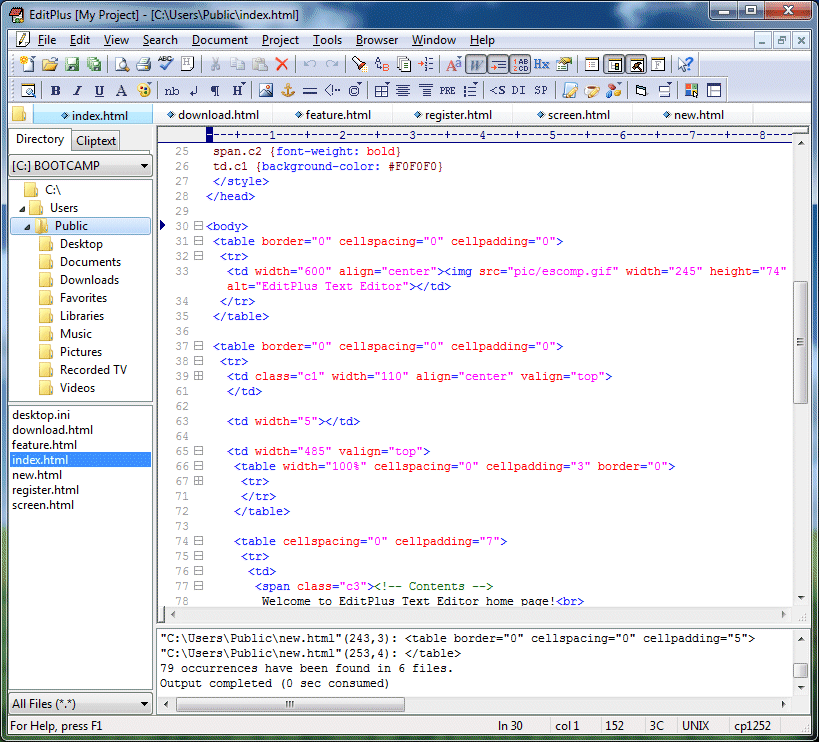
一套功能强大,可取代记事本的文字编辑器,拥有无限制的撤消与重做、英文拼字检查、自动换行、列数标记、搜寻取代、同时编辑多文件、全屏幕浏览功能。而它还有一个好用的功能,就是它有监视剪贴板的功能,能够同步于剪贴板自动将文字粘贴进 EditPlus 的编辑窗口中,让你省去粘贴的步骤。
另外它也是一个非常好用的 HTML 编辑器,它除了支持颜色标记、HTML 标记,同时支持 C、C++、Perl、Java,另外,它还内建完整的HTML & CSS1 指令功能,对于习惯用记事本编辑网页的朋友,它可帮你节省一半以上的网页制作时间,若你有安装 IE 3.0 以上版本,它还会结合E 浏览器于 EditPlus 窗口中,让你可以直接预览编辑好的网页(若没安装IE,也可指定浏览器路径)。另外它也是一个好用的HTML网页编辑软件,除了可以颜色标记HTML Tag (同时支 援 C/C++、Perl、Java) 外,还内置完整的HTML和 CSS1 指令状态,支持 HTML, CSS, PHP, ASP, Perl, C/C++, Java, JavaScript and VBScript;对于习惯用 记事本编辑网页的朋友,它可帮你节省一半以上的网页制作时间。倘若你有安装 IE 3.0以上版本,它还会结合 IE 浏览器于EditPlus的窗口中,让你可以直接预 览编辑好的网页(若没安装IE,也可指定浏览器路径)。是一个相当棒又多用途多 状态的编辑软件。
Version 3.01
This is a bug patch release which accumulates previous bug patch files.
* The default encoding of open file follows system language instead of keyboard language.
* User tool setting could not handle more than 500 characters.
* Increases max number of projects to 500.
* 'New' command on the Cliptext Window did not work.
* Default encoding setting did not apply to new document.
* Upward Regular expression replace did not work correctly.
* 'Cut Marked Lines' did not work correctly with selected text.
* -n command-line option did not work with existing instance.
* Browser menu could temporarily cause program freeze.
* Regular expression '.' could cause program crash.
* Supports RSA signature algorithm for sftp.
* Fixes a keyboard input bug with Korean special characters.
* Supports 'Auto Run' user tool groups.
* 'Color' and 'Table' button did not work correctly on secondary monitor.
* 'Hide output' option for the user tool setting.
* Supports file type based on the first line of file.
* 'Keyboard Map' did not display the correct result.
* Replace in column selection could cause program crash.
* Opening a file from project could cause program crash if the file does not exist.